How to plan launch-week social posts for any campaign
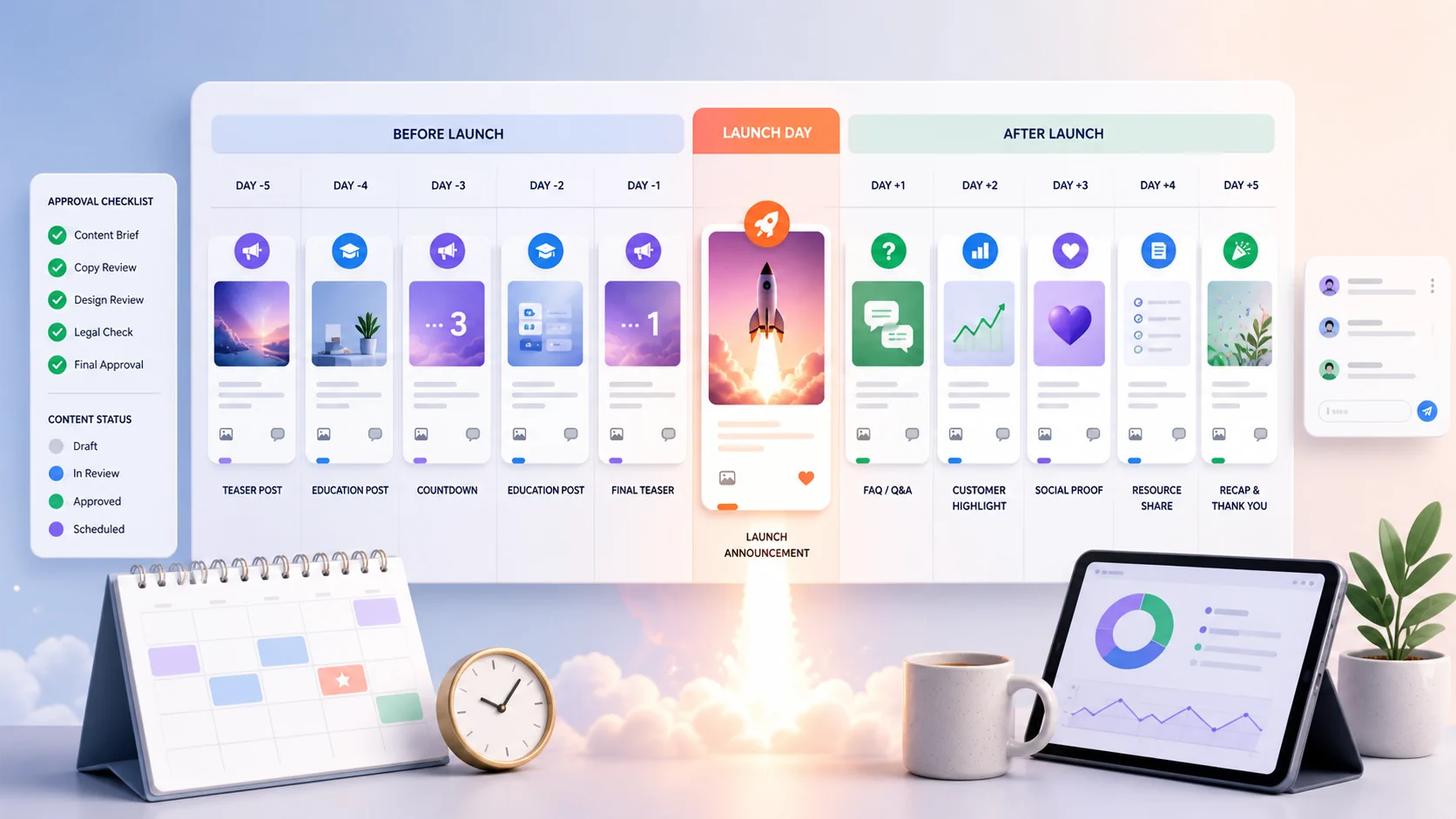
Launch week is when many social media calendars fall apart. The product is ready, the sale is approved, the event is scheduled, or the announcement is final, but the posts are planned too late.
That usually leads to rushed captions, missing links, unclear CTAs, and one generic “we are live” post doing too much work.
A launch-week social media calendar gives the campaign a rhythm before, during, and after the launch. It helps your audience understand what is happening, why it matters, and what to do next.
What launch-week content should do
Launch content has four jobs:
- Create awareness
- Explain the value
- Build trust
- Drive action
If your launch calendar only announces the offer, it skips the education and trust-building people often need before they act. If it only educates, people may never understand the deadline or CTA.
A good launch calendar balances both.
Start with a launch brief
Before writing posts, answer these questions:
- What exactly is launching?
- Who is it for?
- What problem does it solve?
- What is new, timely, or different?
- What should people do next?
- Is there a deadline?
- What proof can you share?
- Which platforms matter most?
- Who approves the final posts?
- What visuals, links, and assets are required?
This brief keeps the launch consistent even when different people write, design, approve, and schedule the content.
A practical launch-week calendar
Use this sequence as a starting point. You can compress it for a small announcement or expand it for a larger campaign.
Seven days before launch, publish a teaser post to create curiosity. Keep it simple and focused on what is coming. For example: “Something new is coming for teams that plan content in advance.”
Five days before launch, share a problem-focused post. This helps your audience understand why the launch is relevant. For example, you might explain why last-minute launch posting hurts results.
Four days before launch, publish an educational post that adds context. This could cover three things every launch calendar should include or explain what makes a campaign easier to manage.
Three days before launch, share a behind-the-scenes post. This makes the launch feel more human and gives people a look at the preparation behind it, such as how your team prepared the assets for launch week.
Two days before launch, publish a proof post to build trust. Share a real example, use case, customer question, screenshot, demo, or process detail that supports the launch.
One day before launch, post a reminder so your audience knows what to expect. Make the timing clear and prepare people for the main announcement.
On launch day, publish the main announcement. Explain what is live, what changed, why it matters, and where people should go next.
One day after launch, share an FAQ post. Use it to answer common questions, reduce friction, and help people decide whether the offer, product, service, or event is right for them.
Three days after launch, publish an objection-handling post. Clarify who it is for, who it is not for, and how someone can decide if it fits their needs.
Seven days after launch, share a recap. Highlight what happened during launch week, what you learned, what content people responded to, and what comes next.
This works because the launch is not depending on one big post. Each post has a job.
Adapt the calendar by launch type
Product launch
Focus on the problem, use case, demo, and next step.
Useful posts include:
- Product walkthrough
- Feature comparison
- Before-and-after workflow
- Customer question answered
- Demo clip
- Use-case carousel
Service launch
Focus on trust, process, outcomes, and fit.
Useful posts include:
- Who the service is for
- What is included
- What the process looks like
- Behind-the-scenes preparation
- Booking reminder
- Client preparation checklist
Sale or promotion
Focus on clarity, timing, and useful product education.
Useful posts include:
- Gift guide
- Product comparison
- Staff picks
- Deadline reminder
- Customer FAQ
- Bundle explanation
Event launch
Focus on why people should attend and what they will get.
Useful posts include:
- Speaker or host introduction
- Agenda preview
- Who should attend
- Question prompt
- Registration reminder
- Post-event recap
Build four content lanes
A launch calendar becomes easier when every post belongs to a lane.
Announcement lane
These posts say what is happening and what action people should take.
Education lane
These posts teach the audience how to think about the problem, product, offer, or event.
Proof lane
These posts show examples, screenshots, demos, testimonials, or process details.
Conversation lane
These posts invite replies, questions, comments, polls, or direct messages.
If the calendar feels too sales-heavy, add more education and conversation. If it feels too soft, add clearer announcement and CTA posts.
Choose one main CTA
A launch can have several posts, but it should not have several competing CTAs.
Choose one primary action:
- Sign up
- Buy now
- Book a call
- Register
- Join the waitlist
- Read the announcement
- Visit the product page
- Claim the offer
Secondary CTAs are fine, but they should support the main action.
Prepare assets before launch week
Prepare:
- Final landing page URL
- UTM links, if needed
- Product or service description
- Launch visuals
- Short videos or demos
- Screenshots
- Approved captions
- Hashtags
- FAQ answers
- Approval notes
- Post owners
A visual calendar helps because you can see whether every post has an asset, caption, link, and status before the campaign begins. In Postoria, teams can organize launch content, reuse captions from the Text & Hashtag Library, store assets in the Media Library, and schedule posts across supported platforms.
Launch-week approval checklist
Before scheduling, confirm:
- The offer is final
- The CTA is clear
- The link works
- The landing page matches the post promise
- The visuals are approved
- Dates and deadlines are correct
- Pricing or availability details are accurate
- The platform formatting is clean
- Someone is ready to respond to comments or messages
- The post-launch follow-up is planned
What to do after launch week
Review:
- Which message created useful engagement
- Which platform drove qualified traffic
- Which questions appeared repeatedly
- Which objections slowed people down
- Which visuals or formats performed best
- Which posts can become evergreen content
Then turn the best launch content into FAQ posts, tutorials, case studies, email content, sales enablement material, or future campaign templates.
Conclusion
A launch-week social media calendar gives your campaign structure. It builds awareness before the announcement, explains value during the launch, answers questions after the launch, and turns the campaign into reusable content.
Start with a brief, plan a balanced sequence, prepare your assets early, and schedule launch content as a campaign instead of a last-minute announcement.