Build a human-in-the-loop social media automation workflow
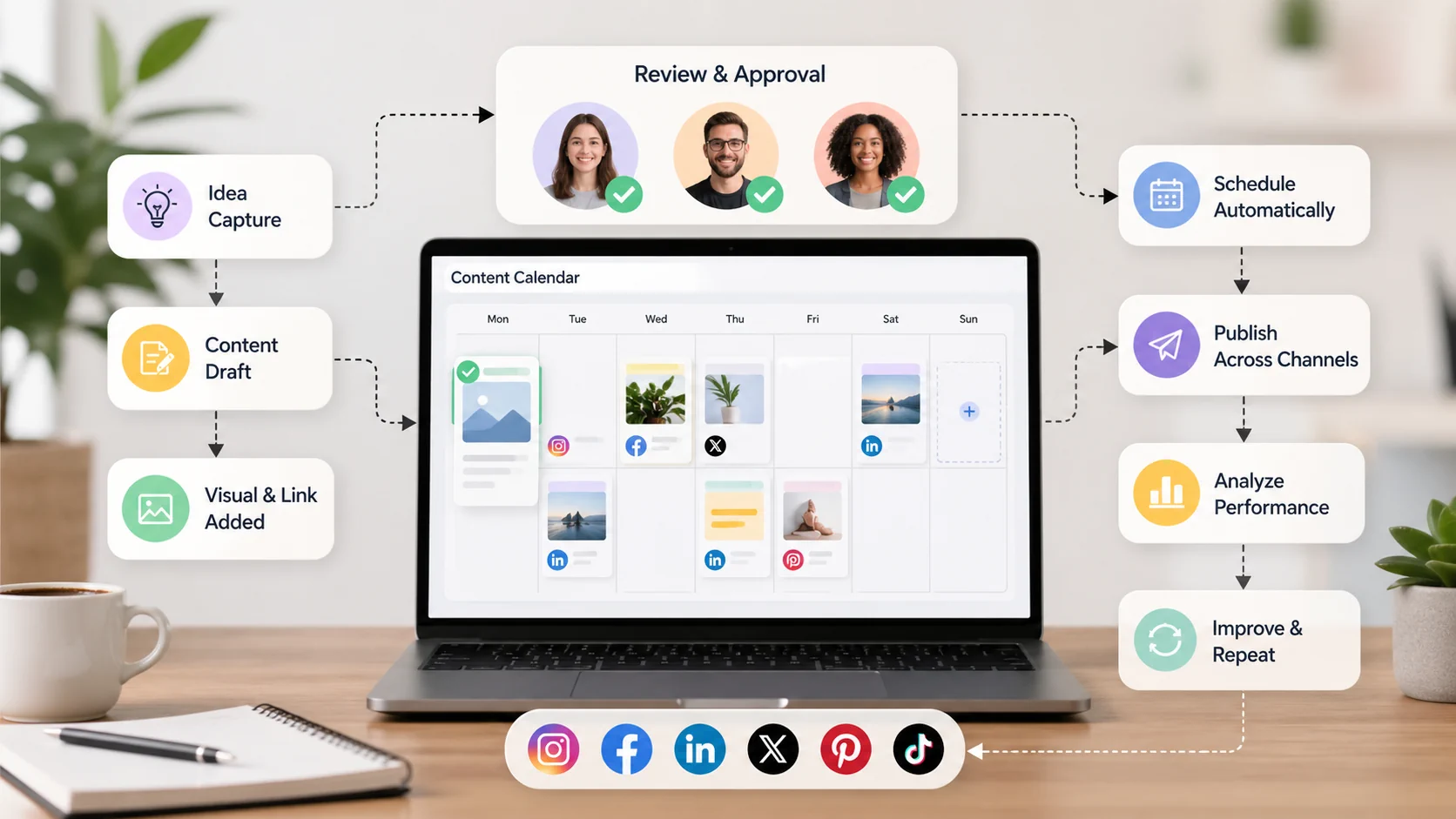
Social media automation can save time, but it should not remove human judgment. The best workflows combine automation for repetitive tasks with human review for strategy, brand voice, sensitive topics, and quality control.
That approach is called human-in-the-loop automation. It lets your team move faster without handing the entire publishing process to software.
Here is how to build a practical human-in-the-loop social media automation workflow.
What human-in-the-loop automation means
Human-in-the-loop automation means a person remains responsible for important decisions while automation handles repeatable steps.
In social media, that may look like:
- Automation creates or queues a draft
- A person reviews the caption
- A person checks the asset and link
- Approved posts are scheduled automatically
- Published content is reviewed through analytics
- Insights are used to improve the next batch
The goal is not to automate everything, but to automate the parts that don’t require judgment so people can spend more time on work that does.
What to automate first
Start with low-risk, high-friction tasks.
Good candidates include:
- Scheduling approved posts
- Reusing approved captions
- Organizing posts into queues
- Turning RSS updates into draft posts
- Preparing product posts from ecommerce feeds
- Bulk uploading posts from a spreadsheet
- Applying common hashtags
- Grouping accounts for repeated publishing
- Sending approved evergreen posts to a calendar
These tasks are repetitive and rule-based. They can save time without putting brand reputation at high risk.
In Postoria, automations, AI captions, and bulk uploads are available on paid plans. That makes them useful for teams that already have a clear review process and want to scale it.
What should stay human
Some parts of social media should not be fully automated.
Keep human review for:
- Sensitive announcements
- Customer complaints
- Cultural or political references
- Legal, health, financial, or compliance topics
- Partnership posts
- Crisis communication
- Humor or sarcasm
- Trend participation
- Final client approval
- Major launch messaging
Automation cannot understand every context. A caption that is technically correct can still be off-brand, poorly timed, or insensitive.
Step 1: map your publishing workflow
Write down the current path from idea to published post.
A common workflow looks like this:
- Idea captured
- Caption drafted
- Asset created
- Link added
- Post reviewed
- Post approved
- Post scheduled
- Post published
- Results reviewed
Now mark which steps are manual, which steps are automated, and which steps require approval.
This map will show where automation can help. It will also show where automation could create risk if added too early.
Step 2: create review gates
A review gate is a point where a human must approve the content before it moves forward.
Useful gates include:
Strategy gate
Does the post support a current goal, campaign, or content pillar?
Brand gate
Does the tone sound like your brand?
Accuracy gate
Are claims, product details, dates, prices, and links correct?
Asset gate
Is the image or video correct, approved, and formatted properly?
Platform gate
Does the post fit the platform where it will be published?
Final scheduling gate
Is the post assigned to the right account, date, time, and campaign?
Not every post needs every gate. A sensitive announcement may need more review than an evergreen tip.
Step 3: assign risk levels
Risk levels make automation easier to manage.
Use three simple categories:
Low risk
Evergreen tips, approved FAQs, recurring reminders, blog post shares, standard product updates, and content that has already been reviewed.
Automation can handle more of this workflow.
Medium risk
Campaign posts, launch reminders, educational posts with claims, partner mentions, and content with links to offers.
Automation can help prepare and schedule, but human review is needed.
High risk
Legal, crisis, customer complaints, sensitive topics, pricing changes, public apologies, and major company announcements.
Automation should be limited. Human review should be required.
Risk levels prevent every post from being treated the same.
Step 4: build reusable templates
Templates make automation safer because they define what a good post should include.
Create templates for:
- Blog post shares
- Product updates
- Event reminders
- Google Business Profile posts
- Customer story posts
- New video announcements
- Seasonal offers
- Newsletter promotions
- Ecommerce product posts
- Educational tips
Each template should include:
- Caption structure
- Required fields
- CTA options
- Link format
- Hashtag rules
- Asset requirements
- Review notes
For example, a blog share template might include the article title, one useful takeaway, a reason to read, and a link CTA.
Step 5: use AI for drafts, not final judgment
AI can help generate caption options, summarize content, or create post variations. It should not be the final reviewer.
A safe AI workflow looks like this:
- Provide the topic, audience, platform, and tone
- Generate several caption options
- Edit for accuracy and brand voice
- Add specific examples
- Check claims and links
- Approve before scheduling
This keeps AI useful without letting generic captions weaken your brand.
Step 6: schedule with visibility
Automation works best when the calendar is visible.
Before posts go live, your team should be able to see:
- What is scheduled
- Which accounts are included
- What campaign each post belongs to
- Which posts are still pending review
- Where there are gaps or overlaps
- Which posts were created automatically
A visual calendar helps prevent accidental overposting, repeated messaging, or missing campaign coverage. Postoria can be used as a central calendar for planning, scheduling, and reviewing posts across supported platforms.
Step 7: audit automations regularly
Automations need maintenance.
Review them weekly or monthly, depending on how often they run.
Check:
- Are the connected accounts still correct?
- Are RSS feeds or ecommerce feeds working?
- Are templates still accurate?
- Are links still valid?
- Are hashtags still relevant?
- Are posts publishing at the right cadence?
- Are automated posts performing as expected?
- Are any posts repetitive or outdated?
- Are permissions and workspaces still correct?
A broken automation can publish the wrong message repeatedly. Regular audits prevent small issues from becoming public problems.
Example workflow: blog post to scheduled social posts
Here is a simple human-in-the-loop workflow for sharing blog posts:
- New blog article is published
- Automation creates draft social posts
- AI suggests platform-specific captions
- A marketer edits the captions
- A designer checks or adds visuals
- A manager approves the posts
- Posts are scheduled across relevant platforms
- Performance is reviewed after publishing
- Winning angles become future content ideas
The automation saves time, but people still make the important decisions.
Human-in-the-loop automation checklist
Before turning on an automation, confirm:
- The automation has a clear purpose
- The content type is low or medium risk
- A human owner is assigned
- Templates are accurate
- Links are tested
- Brand voice rules are documented
- The calendar is visible
- Approval rules are clear
- Analytics will be reviewed
- There is a process to pause the automation if needed
Conclusion
Social media automation is most useful when it supports a clear workflow. Automate repetitive tasks, keep humans responsible for judgment, and build review gates for strategy, voice, accuracy, and timing.
That balance lets your team publish more consistently without turning your social channels into a machine.