Postoria now supports Queues
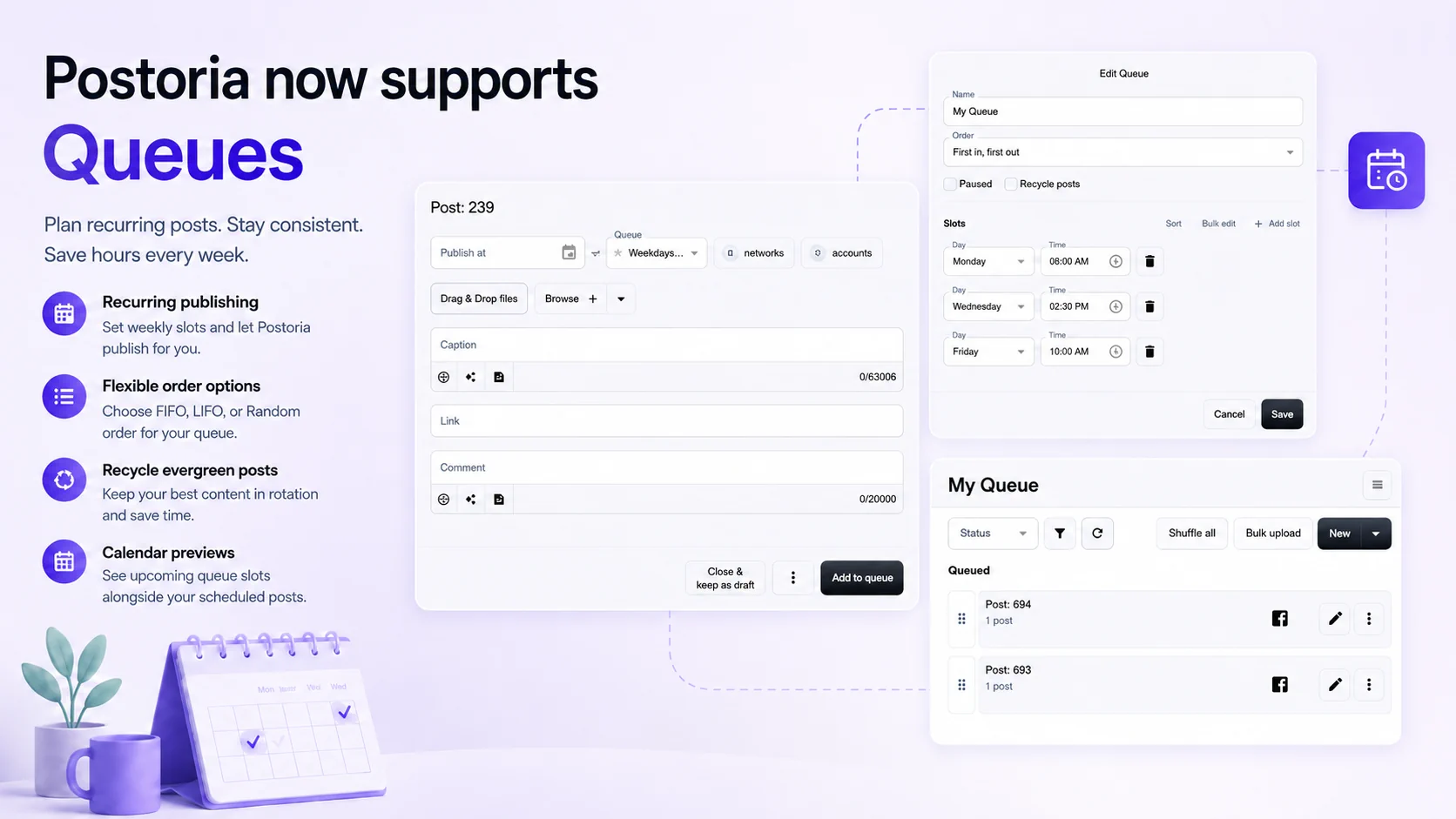
Postoria now supports Queues, a new way to plan recurring social media publishing without choosing a separate date and time for every post.
Queues are designed for content that should keep moving on a regular schedule: evergreen tips, product highlights, blog promotions, educational posts, reminders, campaign assets, and other content that does not need to be tied to one specific calendar date.
Instead of scheduling each post one by one, you can create a queue, choose its publishing slots, add posts to it, and let Postoria pick the next post when each slot arrives.
Queues are available on Pro and Agency plans.
Why Queues matter
Traditional scheduling is useful when a post needs to go live at a specific time.
For example:
- A launch announcement
- A holiday campaign
- A limited-time offer
- An event reminder
- A post that must be published on a specific date
But not every post needs that level of manual scheduling. Many social media workflows include content that simply needs to appear consistently over time.
That is where Queues help.
With Queues, you can build a reusable publishing rhythm. Add posts to a queue, set weekly publishing times, and use the queue as a structured content pipeline. This helps you stay active without repeatedly opening the calendar and assigning dates manually.
How Queues work
A queue combines two things:
- A list of posts
- A recurring publishing schedule
For example, you could create a queue called Evergreen Tips and set it to publish every Monday, Wednesday, and Friday at 10:00.
Then you can add posts to that queue. When a queue slot arrives, Postoria takes the next eligible post from the queue and publishes it according to the queue settings.
This means you can prepare a batch of posts once and let the queue handle the ongoing publishing rhythm.
Add posts to a queue from the post editor
When editing a post, you can now choose a queue instead of choosing a publish date.
The post editor keeps the workflow simple:
- Choose Publish at when the post needs a specific date and time.
- Choose Queue when the post should be added to a recurring queue.
- Leave both empty when you want to publish immediately.
If you select a queue, the action button changes to Add to queue. The post becomes queued and waits for the next available queue slot.
Create queues with weekly publishing slots
Each queue has its own set of slots.
A queue can include one slot or many slots, such as:
- Monday 09:00
- Wednesday 14:30
- Friday 10:00
These slots use your workspace timezone, so your queue schedule follows the same local planning logic as the rest of your workspace.
You can sort slots, edit them manually, or use bulk edit to paste several slots at once. This makes it easier to set up a weekly rhythm quickly, especially if you already know your preferred posting cadence.
Choose how Postoria picks the next post
Queues support different publishing order options.
First in, first out
This is the classic queue behavior. The post at the top of the queue is published first.
Use this when you want posts to go out in the same order you added or arranged them.
Last in, first out
This publishes the newest or lowest-priority-positioned item first, depending on how you organize the queue.
Use this when newer content should move ahead of older queued posts.
Random
Random order lets Postoria pick a random queued post when a queue slot is processed.
This is useful for evergreen content libraries where the exact order is less important than variety. In calendar previews, random queue slots are shown as random queue posts instead of pretending that a specific future post is guaranteed.
Reorder and shuffle queue posts
Queues also support manual ordering.
You can reorder queued posts to control what comes next. This is helpful when priorities change, a campaign needs to move up, or you want to adjust the flow without editing each post individually.
There is also a Shuffle all action for quickly mixing the visible queue order. This is useful when you want more variety but still want the queue to follow a fixed order afterward.
Recycle evergreen posts
Queues can also recycle posts.
When recycling is enabled, a post can return to the queue after it is processed. This is useful for evergreen content that can be reused over time, such as:
- Tips and educational posts
- Popular blog links
- Product reminders
- Brand messages
- Service explanations
- Seasonal content that remains relevant during a campaign window
Recycling helps a small evergreen library cover more future slots without requiring you to duplicate posts manually.
Queue previews in the calendar
Queues are connected to the Postoria calendar.
When you look at your calendar, Postoria can show upcoming queue slots alongside scheduled posts. This helps you understand what is coming next without converting every queued post into a fixed scheduled post ahead of time.
For normal queue order, the preview can show which queued post is expected to appear in an upcoming slot.
For random order, the calendar shows the slot as a random post from that queue, because the exact post is intentionally selected later.
This keeps the calendar useful without making future random selections look more certain than they really are.
Use Queues with bulk upload and automations
Queues also connect naturally with larger content workflows.
If you prepare posts in batches, you can use Bulk Upload to create drafts and then add them to a queue. This is useful when a spreadsheet contains evergreen posts, product reminders, or campaign content that should be published over time instead of all at once.
Automations can also add new content to a queue. For example, content from an RSS feed, ecommerce source, or other automation workflow can be imported into Postoria and added to a queue for controlled publishing.
This gives you a middle path between manual review and full auto-publishing:
- Import only when you want to review everything manually.
- Auto-publish when content should go live automatically.
- Add to queue when content should enter a recurring publishing rhythm.
When to use Queues instead of scheduling
Use scheduling when the exact date matters.
Use Queues when the publishing rhythm matters more than the exact date of each individual post.
Queues are especially useful for:
- Evergreen content
- Recurring tips
- Blog promotion
- Product education
- Agency client content
- Social media maintenance posts
- Multi-account content planning
- Campaign filler content
- Content libraries that should stay active over time
They help you avoid empty calendar gaps while keeping control over what gets published.
A simpler way to stay consistent
Queues are built for consistency.
They do not replace scheduling. Instead, they give you another option for content that does not need a hand-picked date every time.
With Queues, you can create a reusable schedule, add posts when they are ready, reorder them when priorities change, and let Postoria keep the publishing rhythm moving.
If you are already using Postoria to plan and schedule social media content, Queues give you a more flexible way to manage evergreen posts, campaign libraries, and recurring content workflows from the same workspace.
Tag:
product updates