Spintax for social media captions and comments
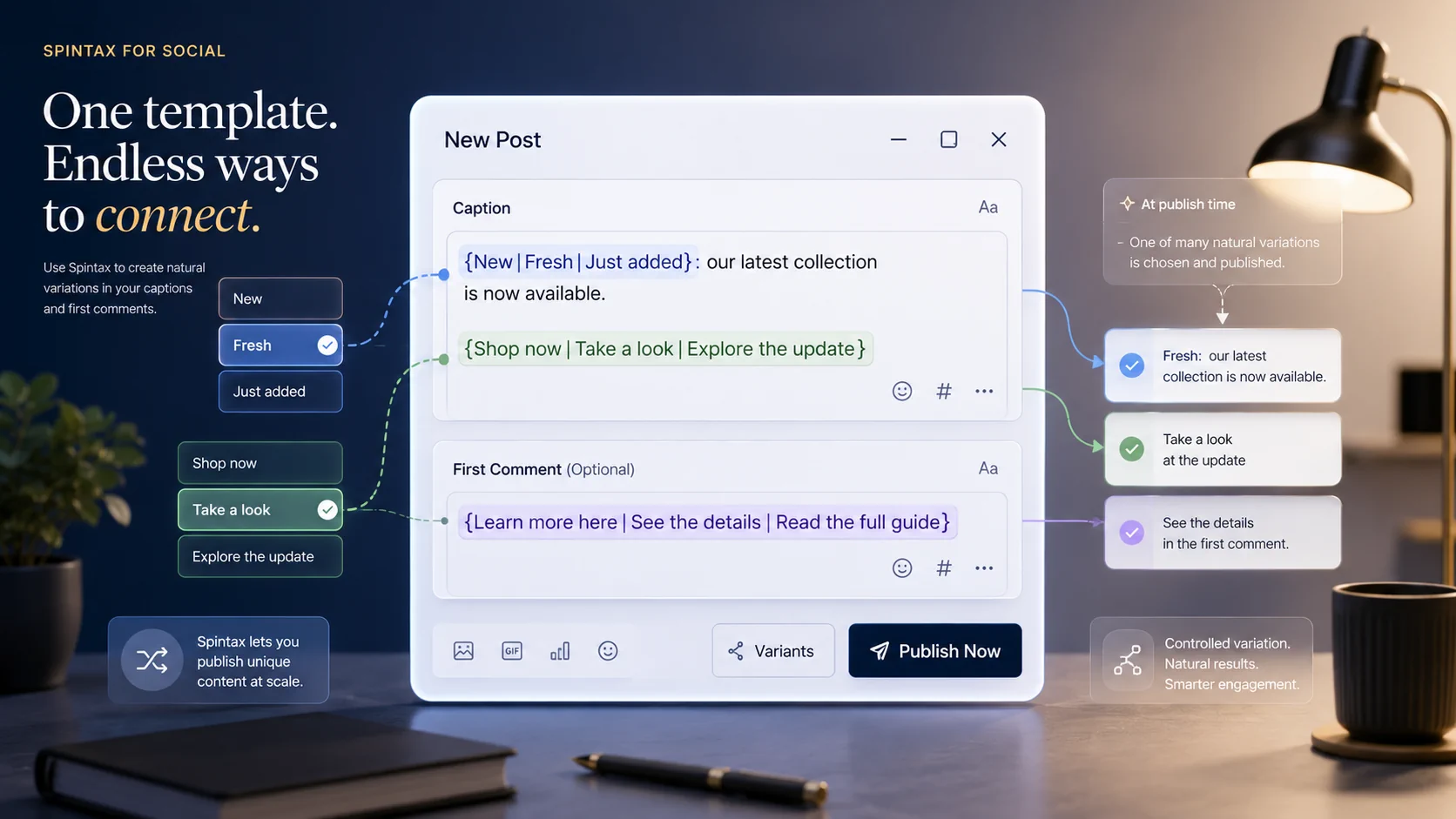
Create natural caption and comment variations without making separate posts for every wording change.
Some social media posts need the same core message, but they should not always use the exact same wording. A launch reminder, evergreen tip, location update, product note, or recurring comment can often work better when small parts of the text vary naturally.
Postoria supports Spintax for captions and comments, so you can write optional wording inside one post and let Postoria choose one variation when the post is published.
What is Spintax?
Spintax is a simple way to write text variations inside curly braces.
For example:
Visit us {today|this week|soon} for fresh arrivals.
When the post is published, Postoria selects one option from the Spintax block. The published text could become:
Visit us today for fresh arrivals.
or:
Visit us this week for fresh arrivals.
or:
Visit us soon for fresh arrivals.
The goal is not to create random content. The goal is to keep repeated social media copy more flexible while preserving the message you planned.
Use Spintax in captions and comments
Postoria processes Spintax in post captions and comments. This makes it useful for workflows where you prepare content ahead of time but still want small wording differences at publish time.
Use Spintax for:
- Caption openings
- Calls to action
- First comments
- Recurring reminders
- Evergreen post variations
- Location or service descriptions
- Campaign support posts
- Product or feature notes
- Light phrasing changes across repeated content
For example, a caption can include several small variations:
{New|Fresh|Just added}: our latest collection is now available. {Shop now|Take a look|Explore the update} before it sells out.
Postoria keeps the template visible while you are preparing the post, then publishes one selected version.
Why Spintax helps social media teams
Spintax is useful when you want variety without turning one idea into many separate drafts.
Avoid repetitive wording
If you schedule similar posts often, repeated phrases can make your content feel mechanical. Spintax lets you prepare small wording alternatives inside the same post.
Keep batch creation faster
When you prepare many posts at once, it is easy to reuse the same opening line or call to action. Spintax helps you keep batch work efficient while still adding variation.
Support evergreen content
Evergreen content is meant to stay useful over time. Spintax can make recurring tips, service reminders, and educational posts feel less repetitive when they appear again later.
Add flexibility to comments
Comments can support the main post with links, extra context, or a softer call to action. Spintax helps those comments avoid sounding identical every time.
Spintax syntax in Postoria
A Spintax block uses curly braces and separates options with a vertical bar:
{option one|option two|option three}Postoria treats a block as Spintax only when it contains an unescaped | separator.
That means this is Spintax:
{near|around|close to}But this is just normal text:
{location.name}This helps keep non-Spintax placeholders, labels, and structured text from being changed unexpectedly.
Escape special characters when needed
Sometimes you may want to use a special Spintax character as normal text. Use a backslash to escape it.
Supported escape sequences include:
\|for a literal|\{for a literal{\}for a literal}\\for a literal\
For example:
{Use A\|B|Use C}This gives Postoria two options:
Use A|BUse C
Escaping is useful when your caption includes code-like text, product names, technical notation, or any content where |, {, or } should appear as normal characters.
Combine Spintax with platform-specific content
A good social media workflow does not mean every platform gets the same caption. Some platforms need shorter copy, some need more context, and some need a stronger call to action.
Postoria already helps you manage platform-specific versions inside a broader publishing workflow. Spintax adds another layer of flexibility inside those versions.
For example:
{Quick tip|Small reminder|Helpful note}: save this before your next content batch.
This kind of variation works well for everyday publishing because the message stays clear, but the wording does not always feel identical.
Practical Spintax examples
Local business update
{Stop by|Visit us|Come in} this week to see what is new.
Product reminder
{Back in stock|Available again|Restocked today}: our most requested item is ready.
Educational post
{Tip|Quick tip|Simple reminder}: keep your best-performing posts easy to reuse.
First comment
{Learn more here|See the details|Read the full guide}:
https://example.com
Evergreen campaign post
{Planning ahead|Building your content calendar|Batching posts} is easier when your workflow is organized.
These examples are intentionally simple. Spintax works best when each option is natural, accurate, and interchangeable in the sentence.
Best practices for Spintax
Use Spintax for controlled variation, not for careless randomness.
Before publishing, check that:
- Every option fits the sentence
- Every option matches the same tone
- The caption still reads naturally after any option is selected
- The call to action stays accurate
- Links, dates, prices, and claims are not randomized carelessly
- Platform-specific rules still apply
- Escaped characters are used when needed
A strong Spintax block should make the post feel more natural, not less reliable.
Where Spintax fits in Postoria
Spintax fits naturally into Postoria’s broader social media publishing workflow.
Use it while planning posts in the calendar, preparing recurring content, writing comments, or creating campaign variations. It can also support larger workflows with Bulk Upload, Queues, and Automations on paid plans, especially when you are preparing evergreen content or repeated campaign messages.
Postoria supports Facebook, Instagram, LinkedIn, Google Business Profile, Threads, Pinterest, YouTube, TikTok, Telegram, Bluesky, Tumblr, and X. You can manage these platforms from one dashboard and keep your publishing workflow organized with workspaces, posting groups, media assets, scheduling, and analytics.
Learn more about the broader workflow on the post across all social media page.
When not to use Spintax
Spintax is not needed for every post.
Avoid it when:
- The post needs exact legal, pricing, or policy wording
- A campaign message has already been approved word for word
- A platform version needs a completely different structure
- Randomized wording could make the message unclear
- The content includes sensitive claims that must be reviewed exactly
In those cases, write the final caption directly. Spintax is best for flexible wording, not fixed compliance language.
Conclusion
Spintax gives social media teams a simple way to add controlled variation to captions and comments. Write one post, add interchangeable phrases where they make sense, and let Postoria select one version when the post is published.
Used carefully, Spintax helps repeated content feel more natural, supports evergreen workflows, and keeps batch publishing efficient without turning every wording change into a separate post.