Social media queues for recurring publishing
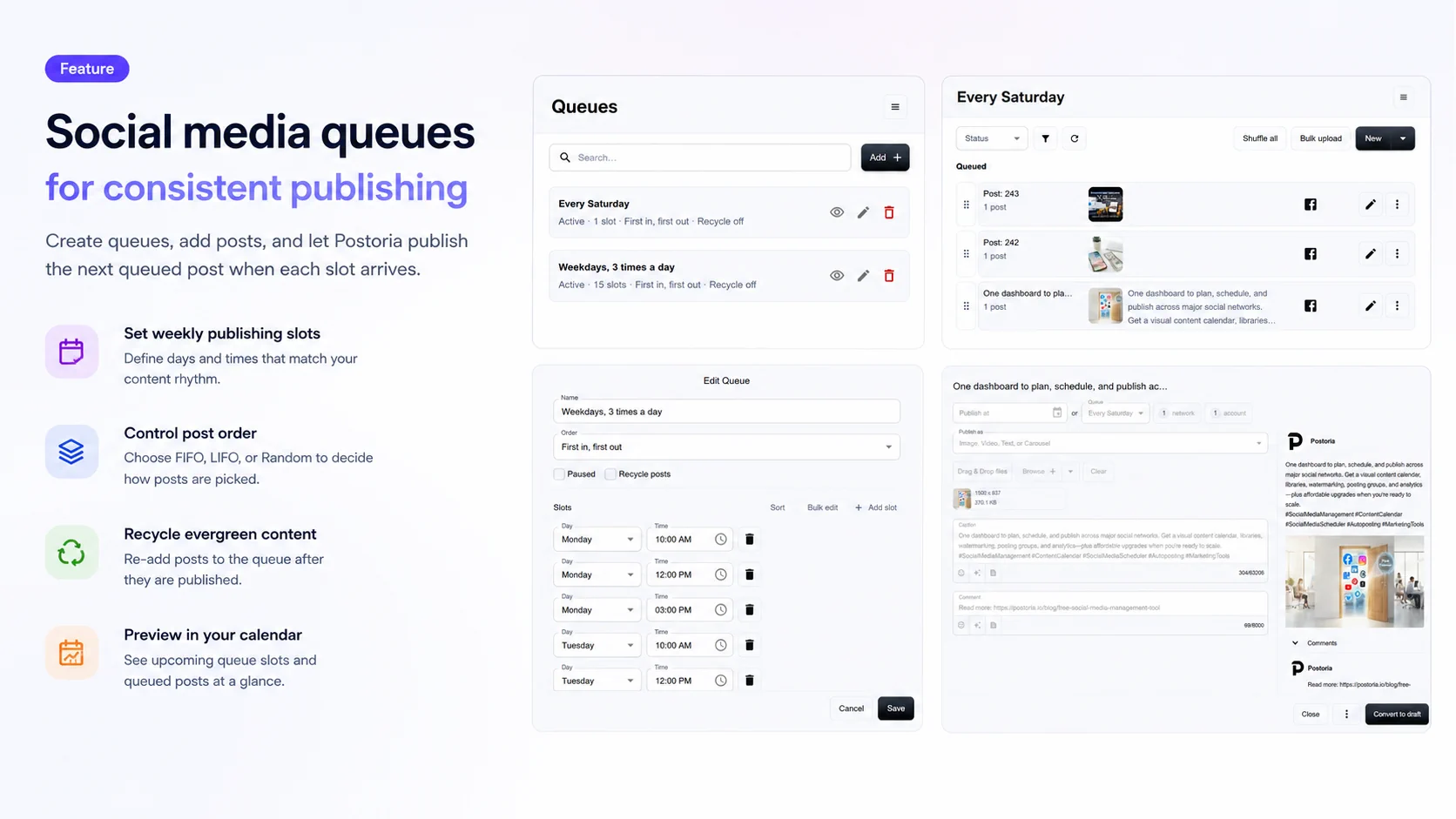
Use Postoria Queues to keep social media publishing consistent without scheduling every post one by one.
Some posts need an exact publishing date. Others simply need to go out regularly.
Queues are built for that second workflow. Create a queue, add recurring publishing slots, put posts into the queue, and let Postoria publish the next queued post when each slot arrives.
Queues are available on Pro and Agency plans.
What social media queues help you do
A social media queue gives you a reusable publishing rhythm.
Instead of picking a separate date and time for every post, you can build schedules such as:
- Monday 09:00 for evergreen tips
- Wednesday 14:30 for blog posts
- Friday 10:00 for product reminders
Then you can add posts to the queue whenever they are ready. Postoria keeps the queue moving according to the slots you set.
This is especially useful for evergreen content, recurring campaigns, agency workflows, and content libraries that should stay active over time.
Queue posts instead of manually scheduling everything
Traditional scheduling is still useful when timing matters.
Use a scheduled post for:
- Launch announcements
- Event reminders
- Holiday campaigns
- Limited-time offers
- Time-sensitive updates
Use a queue when the publishing rhythm matters more than the exact date of each individual post.
Queues work well for:
- Tips and educational posts
- Blog promotion
- Product or service reminders
- Brand messages
- Campaign filler content
- Evergreen posts
- Client content libraries
- Recurring social media maintenance
This gives you two planning options in Postoria: schedule posts for exact dates, or add posts to a queue for recurring publishing.
Create queues with weekly publishing slots
Each queue has its own weekly schedule.
A queue slot includes:
- Day of week
- Time
For example, a queue called Evergreen Tips could publish every Monday, Wednesday, and Friday. Another queue called Blog Posts could publish every Tuesday and Thursday.
Queue slots use your workspace time zone, so your publishing rhythm follows the same planning context as the rest of your workspace.
You can add slots manually, sort them, or use bulk edit to paste several slots at once.
Choose how Postoria picks the next queued post
Queues support different order options, so you can control how posts move through the queue.
First in, first out
Postoria publishes the first post in the queue first.
Use this when you want posts to follow the order you arranged.
Last in, first out
Postoria publishes the last post in the queue first.
Use this when newer or lower-positioned posts should go out before older posts.
Random
Postoria picks a random queued post when a queue slot is processed.
Use this for evergreen content where variety matters more than a fixed order.
Reorder and shuffle queued posts
You can manually reorder queued posts on the queue details page.
This helps when you want to move an important post higher, delay another post, or adjust the publishing flow without assigning dates manually.
Postoria also includes Shuffle all, which quickly randomizes the visible order of posts in a queue. This is useful when you want more variety while still using a fixed queue order afterward.
Recycle evergreen content
Queues can recycle posts.
When Recycle posts is enabled, Postoria can add a post back to the queue after it is processed. This helps a smaller evergreen library cover more future publishing slots.
Recycle posts are useful for content that remains relevant over time, such as:
- Educational tips
- Popular blog links
- Product reminders
- Service explanations
- Brand messages
- Seasonal campaign content
If recycling is disabled, a queued post leaves the queue after it is processed.
Preview queues in your calendar
Queues are connected to the Postoria calendar.
Calendar previews help you see upcoming queue slots alongside scheduled posts. This makes it easier to understand what is coming next without turning every queued post into a fixed scheduled post ahead of time.
For fixed queue orders, Postoria can preview which queued post is expected to appear in a future slot.
For random queues, the calendar shows a random queue preview, such as:
🎲 Random post from Evergreen Tips
This keeps previews useful without pretending that a random future selection is guaranteed.
Add posts to queues from the editor
The post editor keeps queue publishing simple.
At the top of the editor, you can choose between Publish at and Queue.
- Choose Publish at when the post needs a specific date and time.
- Choose Queue when the post should enter a recurring publishing schedule.
- Leave both empty when you want to publish immediately.
When you choose a queue, the action button changes to Add to queue. The post receives the Queued status and waits for the next matching queue slot.
Use queues with bulk upload and automations
Queues also work with larger publishing workflows.
With Bulk Upload, you can prepare many posts and then add draft posts to a selected queue. This is useful for evergreen content libraries, campaign batches, and repeated content themes.
Automations can also add new content to a queue. This gives you a controlled middle path between importing content for review and auto-publishing it immediately.
For example, an automation can import new content and add it to a queue, so it enters your recurring publishing rhythm instead of going live all at once.
Manage queues across supported social networks
Postoria supports Facebook, Instagram, LinkedIn, Google Business Profile, Threads, Pinterest, YouTube, TikTok, Telegram, Bluesky, Tumblr, and X.
Queues fit into that broader publishing workflow. You can create posts, select accounts or posting groups, add posts to queues, and keep your social media calendar organized from one dashboard.
Learn more about Postoria’s broader cross-platform workflow on the post across all social media page.
Who should use social media queues?
Queues are useful for anyone who wants consistent publishing without constant manual scheduling.
Creators
Prepare evergreen posts ahead of time and let a queue keep your channels active.
Small businesses
Build a simple weekly rhythm for tips, offers, updates, and service reminders.
Agencies
Create separate queues for client content themes and keep publishing organized across workspaces.
Marketing teams
Use queues to fill calendar gaps, maintain evergreen campaigns, and reduce repetitive scheduling work.
Queues vs scheduled posts
A scheduled post is best when you know the exact date and time.
A queued post is best when you want Postoria to publish the next available post according to a recurring schedule.
Many teams use both:
- Scheduled posts for launches, campaigns, and deadlines
- Queues for evergreen posts, recurring education, and ongoing content maintenance
This combination gives you control where timing matters and automation where consistency matters.
Pricing for Queues
Queues are available on paid plans.
The Pro plan is $10/month and includes 50 social accounts, 10 workspaces, AI, automations, Teams, and a 7-day trial.
The Agency plan is $25/month and includes 500 social accounts, 100 workspaces, AI, automations, Teams, and a 7-day trial.
You can compare plans on the pricing page.
Conclusion
Queues make social media publishing easier when content needs a recurring rhythm instead of a fixed date.
Create a queue, add weekly slots, choose the order, add posts, and let Postoria keep your publishing schedule moving. If you manage evergreen content, recurring campaigns, or client content libraries, Queues give you a practical way to stay consistent without manually scheduling every post.